

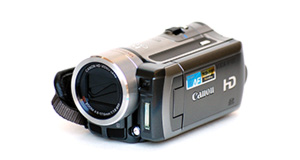
Samsung HMX-F90 overview

Number of problems: 29

Number of solved problems: 5

Number of unsolved problems: 24

Problem resolution: 17%

Compared to other camcorders and video cameras:

Samsung HMX-F90: Likelihood of getting a solution

 Poor
Ranking: 100th out of 100
Most likely to get a solution:
Toshiba Camileo X200 - problem resolution score of 100%
Least likely to get a solution:
Samsung HMX-F90 - 5 out of 29 problems solved
Common problems with the Samsung HMX-F90
Unsolved problem list for the Samsung HMX-F90
(Click on a problem to comment or help)

Jump to page: [1] [2] [3] [4] [5]

My camera keeps automatically zooming in when I zoom out it starts zooming in again.


My camera is automatically zooming when I zoom out it starts zooming in again.


My samsung hmx-f90 it turns on but only "samsung" was display on the screen and i cannot use any button.If i have to turn it off i remove the battery.


When I shot and uploaded my first video, the video resolution was significantly worse than what my wife's camera was able to do. How can I improve the video resolution. It is already set for the highest resolution 1280 x 720.


My Samsung HMX-F90 camera Is not recognizing the USB cable that it was recognizing literally 3 days ago. On top of that I just filled up it's SD card with many hours of filming that I need but cannot use because it is locked into the SD card. It's recognizing the cable for charging purposes but a brief message keeps flashing on screen when I connect it that mentions some nonsense "Please use the cable provided"... this is making me Irate as no cable was provided with this model and I had to buy one off of Amazon at full price! Please... is there anything I can do short of buying a different Camera?


I turn on the camera and the screen won't turn on and the blue light in back goes to playback but I can't change mode.


does not turn on


The sound, when playngt a recorded movie file, is almost destroyed. It's full of interruptions.


I just brought a Samsung hmx- f 90and menu is on I scene auto .

How can I change that to go back to menu screen .

I was unable to set my time and date and language .

Can you please help.

Thanks carol


Problem: My camcorder hmx-90 does not access the menu and shoot zoom


Solutions for the Samsung HMX-F90
0 people also had this problem.

Problem: My camcorder won't focus on close-up objects

There are 0 comments on this problem.

Solution 1: Your camcorder's autofocus is probably having problems locking on to objects in the foreground. In the settings menu, choose the macro function where available. You'll see it shown with an icon of a small flower.
0 out of 0 people found this solution helpful.
Was this solution helpful?
There are 0 comments on this solution.

Post comments, submit alternative solutions or receive notifications


0 people also had this problem.

Problem: Out of space.

There are 0 comments on this problem.

Solution 1: You need to back up your recordings. Copy them to a computer. If you record them to a DVD, don't rely on this to store your precious videos. Recordable DVDs degrade over time.
0 out of 0 people found this solution helpful.
Was this solution helpful?
There are 0 comments on this solution.

Post comments, submit alternative solutions or receive notifications


0 people also had this problem.

Problem: Battery keeps running out too quickly.

There are 0 comments on this problem.

Solution 1: Rechargable batteries have a limited life and they hold their charge less and less as their life goes on. You probably need a new battery.

To help your battery last longer, try to charge it fully every time and don't stop it charging when it's not finished.

If your unit is brand new, it might have a faulty battery. Contact your retailer.
0 out of 0 people found this solution helpful.
Was this solution helpful?
There are 0 comments on this solution.

Post comments, submit alternative solutions or receive notifications


0 people also had this problem.

Problem: I can't watch videos on my computer

There are 0 comments on this problem.

Solution 1: Your computer might not have the right software installed to watch the kind of video your camera takes. Install the software that came with your camera, or as an alternative, Google "VLC" for a great video player that will install on most computers and play almost all kinds of video.
0 out of 0 people found this solution helpful.
Was this solution helpful?
There are 0 comments on this solution.

Post comments, submit alternative solutions or receive notifications


0 people also had this problem.

Problem: I can't transfer videos to the computer via USB.

There are 0 comments on this problem.

Solution 1: 1) Check your USB cable is plugged in fully.
2) Check your camera is connected to a power source, the best is mains power (even if your camera has a good battery).
3) You might have to put the camera into "play" more (rather than "record" mode.
0 out of 0 people found this solution helpful.
Was this solution helpful?
There are 0 comments on this solution.

Post comments, submit alternative solutions or receive notifications


Jump to page: [1]

Post a new question about the Samsung HMX-F90
All problems on this page have been submitted and answered by users. If you have a problem with the Samsung HMX-F90, please submit it below and we'll post it here.

Details of your problem:
Please ensure that the above box is not empty


Please note that all problems are moderated.


  Back to top
Solve an unsolved problem for the Samsung HMX-F90

Can you help?
If you can solve a currently unsolved problem, please select the problem you can solve from the list below.
Even if you can't solve it, you can still comment on problems if you think it would help.


Jump to page: [1] [2] [3] [4] [5]
3 people also had this problem.

Problem: My camera keeps automatically zooming in when I zoom out it starts zooming in again.

There are 0 comments on this problem.

Post solution, add your comments or receive notifications


4 people also had this problem.

Problem: My camera is automatically zooming when I zoom out it starts zooming in again.

There is 1 comment on this problem. Show/Hide
- sorry I posted it twice.
Helpful: 0/0     Do you think this comment was helpful?

Post solution, add your comments or receive notifications


7 people also had this problem.

Problem: My samsung hmx-f90 it turns on but only "samsung" was display on the screen and i cannot use any button.If i have to turn it off i remove the battery.

There are 0 comments on this problem.

Post solution, add your comments or receive notifications


2 people also had this problem.

Problem: When I shot and uploaded my first video, the video resolution was significantly worse than what my wife's camera was able to do. How can I improve the video resolution. It is already set for the highest resolution 1280 x 720.

There are 0 comments on this problem.

Post solution, add your comments or receive notifications


3 people also had this problem.

Problem: My Samsung HMX-F90 camera Is not recognizing the USB cable that it was recognizing literally 3 days ago. On top of that I just filled up it's SD card with many hours of filming that I need but cannot use because it is locked into the SD card. It's recognizing the cable for charging purposes but a brief message keeps flashing on screen when I connect it that mentions some nonsense "Please use the cable provided"... this is making me Irate as no cable was provided with this model and I had to buy one off of Amazon at full price! Please... is there anything I can do short of buying a different Camera?

There are 0 comments on this problem.

Post solution, add your comments or receive notifications


2 people also had this problem.

Problem: I turn on the camera and the screen won't turn on and the blue light in back goes to playback but I can't change mode.

There are 0 comments on this problem.

Post solution, add your comments or receive notifications


1 person also had this problem.

Problem: does not turn on

There are 0 comments on this problem.

Post solution, add your comments or receive notifications


0 people also had this problem.

Problem: The sound, when playngt a recorded movie file, is almost destroyed. It's full of interruptions.

There are 0 comments on this problem.

Post solution, add your comments or receive notifications


0 people also had this problem.

Problem: I just brought a Samsung hmx- f 90and menu is on I scene auto .

How can I change that to go back to menu screen .

I was unable to set my time and date and language .

Can you please help.

Thanks carol

There are 0 comments on this problem.

Post solution, add your comments or receive notifications


0 people also had this problem.

Problem: Problem: My camcorder hmx-90 does not access the menu and shoot zoom

There are 0 comments on this problem.

Post solution, add your comments or receive notifications


Actions - No registration required
Find a Camcorder and Video Camera
AEE
Aiptek
Canon
Contour
Easypix
GoPro
Hyundai
Ingo
ION
JVC
Klarstein
Kodak
Liquid Image
Mustek
Nikon
Oregon Scientific
Panasonic
Polaroid
Praktica
Rollei
Samsung
Sanyo
Sony
Toshiba
Veho
Vivikai
Vivitar
Yashica