

|
|


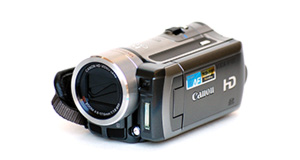
Polaroid XS100 overview
Number of problems: 22
Number of solved problems: 12
Number of unsolved problems: 10
Problem resolution: 55%
Compared to other camcorders and video cameras:
Polaroid XS100: Likelihood of getting a solution
Ranking: 3rd out of 100
Most likely to get a solution:
Toshiba Camileo X200 - problem resolution score of 100%
Toshiba Camileo X200 - problem resolution score of 100%
Least likely to get a solution:
Samsung HMX-F90 - 5 out of 29 problems solved
Samsung HMX-F90 - 5 out of 29 problems solved
Solved problem list for the Polaroid XS100
(Click on a problem to see the solution)Jump to page:
[1] [2]
I can't watch videos on my computer
I can't transfer videos to the computer via USB.
I connected the xs100 to the TV, the screen showed what it was pointing at but the buttons did nothing and now it has frozen and won't turn off.
about 50% of the time when i push the record button forward, it will record for 5-30 seconds and then stop recording by itself, fully charged, empty disk, but takes photos fine.
when i charge my xs100 the red led doesn't turn off, but i think the battery is charging.
I can't connect my camera on my PC because windows doesn't recognize anything... someone can resolve my problem?
My camcorder won't focus on close-up objects
I'm having difficulty in connecting the camera to my PC. Both the camera and the PC lock up and freeze when I connect them and turn the camera on.
Video automatically cuts out after about 25 minutes. How can I prevent this?
Helmet mount is broken, can I get a replacement anywhere?
Unsolved problem list for the Polaroid XS100
(Click on a problem to comment or help)Jump to page:
[1] [2]
no sound on my records pls help
I can connect phone wifi to the XS100i WiFi Extreme camera. I can connect a computer tot he camera. I cna not connect the Polaroid Remote Control app to the camera - it keeps coming up with failed connection (even though the pohone is connected to the camera). Any suggestions?
Eventually I want to connect the camera to my office wifi network and connect my viewing device to that network vs directly to the camera. Anyone know how to do that?
the camera stop working, and pushing the reset button doesn´t work. I have fully charged the battery. It doesn´t swicth and so, I can´t see whats going on in my computer.
I cannot get the auto-rotate feature to work. I've went to settings, turned it on and off. I've even reset the camera. I've rotated the camera before and after turning it on too.
I have just taken delivery of a XS100 and would like to use the camera for long distance European motorcycle touring, if I plug in the USB to charge whilst it is recording the camera simply stops recording, if I can not charge and record at the same time then the camera has a missive disadvantage over my Drift camera and I will have to return it for another Drift.
I have just taken delivery of a XS100 and would like to use the camera for long distance European motorcycle touring, if I plug in the USB to charge whilst it is recording the camera simply stops recording, if I can not charge and record at the same time then the camera has a missive disadvantage over my Drift camera and I will have to return it for another Drift.
Camera won't turn off plz help
the battery will not charge when plugged in to the computer the red light will not come on like is suppose to, if I turn the camera on the computer does display whats is on the inside of the memory, I have already reset the camera try with or without memory but it will not charge, i have also tried in a different computer same outcome diffent cable same out come, any other suggestions
When I connect my xs100 the red led doesn't turn off and the battery doesn't charge, even when I left it for more than 3 hours connected to my laptop. I've already change the computer and cable too.
Also when I run the polaroid app, Windows 7 shows a message saying "Connection failed. Please connect your camera".
I PLUG IT IN AND THE LIGHT WONT STOP FLASHING. AND IT DOES NOT TURN ON
Solutions for the Polaroid XS100
0 people also had this problem.
Problem: I can't watch videos on my computer
There are 0 comments on this problem.
Solution 1: Your computer might not have the right software installed to watch the kind of video your camera takes. Install the software that came with your camera, or as an alternative, Google "VLC" for a great video player that will install on most computers and play almost all kinds of video.
0 out of 0 people found this solution helpful.
Was this solution helpful?
There are 0 comments on this solution.

0 people also had this problem.
Problem: I can't transfer videos to the computer via USB.
There are 0 comments on this problem.
Solution 1: 1) Check your USB cable is plugged in fully.
2) Check your camera is connected to a power source, the best is mains power (even if your camera has a good battery).
3) You might have to put the camera into "play" more (rather than "record" mode.
0 out of 0 people found this solution helpful.
Was this solution helpful?
There are 0 comments on this solution.
13 people also had this problem.
Problem: I connected the xs100 to the TV, the screen showed what it was pointing at but the buttons did nothing and now it has frozen and won't turn off.
There are 2 comments on this problem.
Show/Hide
- Ours does the same thing, also it never records sound I wouldn't buy this again it's very disappointing. The picture quality is excellent but the problems out weigh this.
Helpful: 0/0 Do you think this comment was helpful?
- Have you tried unplugging the cable?
Helpful: 0/0 Do you think this comment was helpful?
Solution 1: You must reset
2 out of 2 people found this solution helpful.
Was this solution helpful?
There is 1 comment on this solution.
Show/Hide
- Is there anything I can do to prevent this from happening in the first place?
Helpful: 0/0 Do you think this comment was helpful?
11 people also had this problem.
Problem: about 50% of the time when i push the record button forward, it will record for 5-30 seconds and then stop recording by itself, fully charged, empty disk, but takes photos fine.
There are 0 comments on this problem.
Solution 1: *Update from asker* I contacted polaroid direct and they were very helpful, they said when using a mac to delete files, it can leave corrupt files on the disk which causes the problem. Best way to solve is to format the disk using the camera itself plugged into a screen! I also reset each time for good measure!
5 out of 6 people found this solution helpful.
Was this solution helpful?
There are 0 comments on this solution.
0 out of 0 people found this solution helpful.
Was this solution helpful?
There are 0 comments on this solution.
0 out of 1 person found this solution helpful.
Was this solution helpful?
There are 2 comments on this solution.
Show/Hide
- This is good to know, but for simplicity I'm going to stick to the first solution. Thanks anyway, though.
Helpful: 0/0 Do you think this comment was helpful?
- This is good to know, but for simplicity I'm going to stick to the first solution. Thanks anyway, though.
Helpful: 1/2 Do you think this comment was helpful?
1 out of 1 person found this solution helpful.
Was this solution helpful?
There are 0 comments on this solution.
0 out of 0 people found this solution helpful.
Was this solution helpful?
There are 0 comments on this solution.


